What does the SAP Memory Analyzer do?
The Memory Analyzer was developed to analyze productive heap dumps with hundreds of millions of objects. Once the heap dump is parsed, you can re-open it instantly, immediately get the retained size of single objects and quickly approximate the retained size of a set of objects. The Analyzer is (relatively) low on resource consumption, so you can analyze multi-GB heap dumps on 32 bit boxes.
What heap dumps are supported?
SAP Memory Analyzer supports HPROF binary heap dumps, a de-facto standard of Sun supported also by other vendors:
Sun, SAP and HP JDK/JVM from version 1.4.2_12 and 5.0_7 and 6.0 upwards
IBM doesn’t support HPROF binary heap dumps. Therefore IBM heap dumps can’t be analyzed with the SAP Memory Analyzer. We know of no tool to convert an IBM heap dump into an HPROF binary heap dump, but surely such a converter (System Dump/DTFJ API -> HPROF binary heap dump) could be written.
On what platforms does the SAP Memory Analyzer run?
The Memory Analyzer is based on Eclipse 3.3. You can either download the standalone application or unzip the plug-ins to your Eclipse installation. The former is available for all platforms that SWT is available. We greatly appreciate your feedback regarding platforms other than Windows as our scare resources let us primarily target
Friday, July 16, 2010

4G Langages
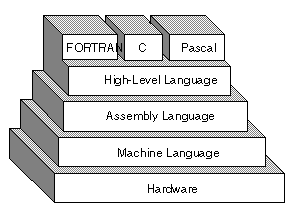
Often abbreviated 4GL, fourth-generation languages are programming languages closer to human languages than typical high-level programming languages. Most 4GLs are used to access databases. For example, a typical 4GL command is
SELECT FIELD FROM TABLE INTO STRUCTURE
The other four generations of computer languages are
first generation: machine language
second generation: assembly language
third generation: high-level programming languages, such as C, C++, and Java.
fifth generation: languages used for artificial intelligence and neural networks.
A programming languages are derived from computer's machine language. Machine languages consist entirely of numbers and are almost impossible for humans to read and write. Assembly languages have the same structure and set of commands as machine languages, but they enable a programmer to use names instead of numbers.
Each type of CPU has its own machine language and assembly language, so an assembly language program written for one type of CPU won't run on another. In the early days of programming, all programs were written in assembly language. Now, most programs are written in a high-level language such as FORTRAN or C. Programmers still use assembly language when speed is essential or when they need to perform an operation that isn't possible in a high-level language.
Fourth-generation languages are smart way of communicating with computers as much like the processes executing intelligent algorithms. Certain tasks can be performed faster and more accurately by traditionally programmed computers than by human beings, particularly numerical computation and the storage, retrieval, and sorting of large quantities of information. Some of the features of a 4 G language are exception handling, Object Orientation in programming. Object-Relation Mapping, garbage collection and dynamic binding.
For a better understanding of different high level languages you can follow this link. http://99-bottles-of-beer.net/
Solution Manager
The SAP Solution Manager supports you throughout the entire life-cycle of your solutions, from the Business Blueprint to the configuration to production processing. It provides central access to tools, methods and preconfigured contents which you can use during evaluation, implementation and operational processing of your systems.
Features:-
Implementing and Upgrading SAP Solutions:
Central access to all tools for your project (Project Administration, Business Blueprint, Configuration, Test Workbench, create Group Rollout templates)
Central management of all information for your Project (roadmaps, system landscape, project documentation)
Compare and synchronize customizing in different SAP components
Solution Monitoring:
Central System administration
Analysis of your system landscape with Service Level Reporting
Real-time System Monitoring
Business process monitoring
Services and Support:
Access to programs and Services to monitor and optimize the performance and availability of your system landscapes, and minimize risks when running your systems
Service Desk:
Solution support with workflow to Create and Process Problem Messages
Change Management:
Manage change requests, with workflow to trace and audit changes and transports in your system landscape with Change Request Management.
Features:-
Implementing and Upgrading SAP Solutions:
Central access to all tools for your project (Project Administration, Business Blueprint, Configuration, Test Workbench, create Group Rollout templates)
Central management of all information for your Project (roadmaps, system landscape, project documentation)
Compare and synchronize customizing in different SAP components
Solution Monitoring:
Central System administration
Analysis of your system landscape with Service Level Reporting
Real-time System Monitoring
Business process monitoring
Services and Support:
Access to programs and Services to monitor and optimize the performance and availability of your system landscapes, and minimize risks when running your systems
Service Desk:
Solution support with workflow to Create and Process Problem Messages
Change Management:
Manage change requests, with workflow to trace and audit changes and transports in your system landscape with Change Request Management.
ASAP
ASAP: Accelerated Systems Application and Products in Data
Processing
ASAP methodology means nothing but standard process for
implementation of SAP, It consists of 5 phases.
1. Project preparations - consists of identifying team members and
developing strategy as how to go.
In this phase of the ASAP Roadmap, decision-makers define clear
project objectives and an efficient decision-making process. A project charter
is issued, an implementation strategy is outlined, and the project team as well
as its working environment are established.
The first step is for the project managers to set up the implementation
project(s). They draw up a rough draft of the project, appoint the project team
and hold a kickoff meeting. The kickoff meeting is critical, since at this time
the project team and process owners become aware of the project charter and
objectives and are allocated their responsibilities, lasting throughout the
project.
2. Business Blue print - consists of identifying the client current
process, requirement and how SAP provides solution.Consists of detailed documentation
In this phase you document and define the scope of your R/3 implementation and create the Business Blueprint. The Business Blueprint is a detailed documentation of your company’s requirements in Winword format. Application consultants and the Business Process Teams achieve a common understanding of how the enterprise intends to run its business within the R/3 System, by carrying out requirements-gathering workshops.
During Phase 2, the project team completes R/3 Level 2 training;
this is recommended as early as possible and before the workshops start.
The project team selects the processes that best fit your business from R/3’s functional offering, using the following tools:
3. Realization -The purpose of this phase is to implement all the
business and process requirements based on the Business Blueprint.Unit Test and String Tests are performed followed by documentation of UTR/UTP's and Test Cases. Business Acceptance Test (BAT)
The purpose of Phase 3 is to configure the R/3 System, in order
to have an integrated and documented solution which fulfills your business process
requirements.
In this phase, configuration of your system is carried out
in two steps: Baseline and Final Configuration. The Baseline configuration is
designed to configure about 80% of your daily business transactions and all
of your master data, and organizational structure. The remaining configuration
is done in process-oriented cycles. The Business Blueprint is used as the guide
for the system configuration, done using the Implementation Guide, which will
be described in detail in this chapter. After this, data transfer programs,
as well as interfaces, need to be tested.
4 Final Preparation - The purpose of this phase is to complete
testing, end-user training.
The purpose of this phase is to complete the final preparation
of the R/3 System for going live. This includes testing, user training, system
management and cutover activities, to finalize your readiness to go live. This
Final Preparation phase also serves to resolve all crucial open issues. On successful
completion of this phase, you are ready to run your business in your productive
R/3 System.
In Phase 4, your end users go through comprehensive training.
The last step will be to migrate data to your new system. In particular a going-live
check is carried out and an R/3 Help Desk set up.
5 Go Live and Support
All the functional consultants need good rape with Abaper’s
Now you are ready to go live with your productive system! Afterwards,
the project team focuses on supporting the end users, for which training may
not be completed. It is also necessary to establish procedures and measurements
to review the benefits of your investment in R/3 on an ongoing basis. Key SAP
Services to support you in this phase include
The Online Service System (OSS)
Remote Consulting
EarlyWatch® Services
These services encompass a series of remote analyses of specific R/3 System
settings, with recommendations for improving system performance.
Development QA/ Testing Production
1. Project
preparation
2. Business Blue
print
3. Realization
4. Testing/QA
5. Go Live
Few Documents that are to be recorded in these phases are.
1. Functional Specifications.
2. Technical Specifications.
3. UTR/UTP
4. Test Cases
5. Delivery Documents
Processing
ASAP methodology means nothing but standard process for
implementation of SAP, It consists of 5 phases.
1. Project preparations - consists of identifying team members and
developing strategy as how to go.
In this phase of the ASAP Roadmap, decision-makers define clear
project objectives and an efficient decision-making process. A project charter
is issued, an implementation strategy is outlined, and the project team as well
as its working environment are established.
The first step is for the project managers to set up the implementation
project(s). They draw up a rough draft of the project, appoint the project team
and hold a kickoff meeting. The kickoff meeting is critical, since at this time
the project team and process owners become aware of the project charter and
objectives and are allocated their responsibilities, lasting throughout the
project.
2. Business Blue print - consists of identifying the client current
process, requirement and how SAP provides solution.Consists of detailed documentation
In this phase you document and define the scope of your R/3 implementation and create the Business Blueprint. The Business Blueprint is a detailed documentation of your company’s requirements in Winword format. Application consultants and the Business Process Teams achieve a common understanding of how the enterprise intends to run its business within the R/3 System, by carrying out requirements-gathering workshops.
During Phase 2, the project team completes R/3 Level 2 training;
this is recommended as early as possible and before the workshops start.
The project team selects the processes that best fit your business from R/3’s functional offering, using the following tools:
3. Realization -The purpose of this phase is to implement all the
business and process requirements based on the Business Blueprint.Unit Test and String Tests are performed followed by documentation of UTR/UTP's and Test Cases. Business Acceptance Test (BAT)
The purpose of Phase 3 is to configure the R/3 System, in order
to have an integrated and documented solution which fulfills your business process
requirements.
In this phase, configuration of your system is carried out
in two steps: Baseline and Final Configuration. The Baseline configuration is
designed to configure about 80% of your daily business transactions and all
of your master data, and organizational structure. The remaining configuration
is done in process-oriented cycles. The Business Blueprint is used as the guide
for the system configuration, done using the Implementation Guide, which will
be described in detail in this chapter. After this, data transfer programs,
as well as interfaces, need to be tested.
4 Final Preparation - The purpose of this phase is to complete
testing, end-user training.
The purpose of this phase is to complete the final preparation
of the R/3 System for going live. This includes testing, user training, system
management and cutover activities, to finalize your readiness to go live. This
Final Preparation phase also serves to resolve all crucial open issues. On successful
completion of this phase, you are ready to run your business in your productive
R/3 System.
In Phase 4, your end users go through comprehensive training.
The last step will be to migrate data to your new system. In particular a going-live
check is carried out and an R/3 Help Desk set up.
5 Go Live and Support
All the functional consultants need good rape with Abaper’s
Now you are ready to go live with your productive system! Afterwards,
the project team focuses on supporting the end users, for which training may
not be completed. It is also necessary to establish procedures and measurements
to review the benefits of your investment in R/3 on an ongoing basis. Key SAP
Services to support you in this phase include
The Online Service System (OSS)
Remote Consulting
EarlyWatch® Services
These services encompass a series of remote analyses of specific R/3 System
settings, with recommendations for improving system performance.
Development QA/ Testing Production
1. Project
preparation
2. Business Blue
3. Realization
4. Testing/QA
5. Go Live
Few Documents that are to be recorded in these phases are.
1. Functional Specifications.
2. Technical Specifications.
3. UTR/UTP
4. Test Cases
5. Delivery Documents
SAP CRM Architecture

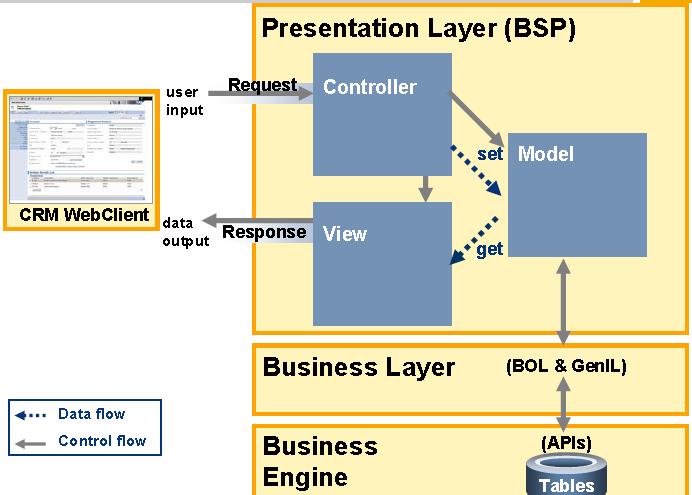
SAP CRM Web Client Architecture is technically advanced built on netweaver. UI is built up on three different layers.
Business Engine and business Layers are responsible for linking a CRM Business Functionalities within CRM WebClient UI and presentation layer represents main development environment for Web Client UI where single screens can be designed
The business Server Pages (BSP's) are representing the presentation layer of CRM WebClient. They are used to generate the HTML page of CRM WebClient running in the user browser
The business logic of CRM business objects and process are not controlled by the bsps, they are controlled by business layer and business Engine.
Business objects of an CRM Webclient session like business partners, products, transactions, etc. are hold in the Business Object Layer(BOL).
The main framework approach of WebClient UI It is build by the concept of Model-View-Controller.
The MVC - Application is located in third level of a three level client server technology.
The programming model mentioned above is not specific to SAP instead its a generic approach of how to develop a software with a clear separation of business logic and data model and the specific visual presentation of this data
We Distinguish between Model, View, Controller of an application.
Within the application there is a strict separation of reading / changing data,showing data and reacting to user inputs.
Model is a kind of black box entity which contains all necessary methods to get access to business data function.
In case of webclient UI the model corresponds to SAP CRMs Business Layer and Business Engine. All available business objects can be found here.
The views responsibility is to display the data coming from the model and offer an interface to the enduser for working on the data.
The controller is acting as a live intermediate element between a view and a model. It receives and processes user requests, to call certain business functionalities within a model. It receives and processes user requests, to call certain business functionalities within a model and invokes data output with a view.
For example user is pressing a button to get more detailed data shown, controller processes button click, to launch according to business method in model and takes over returning data which will be put into the view for display.
Introduction to SAP CRM
CRM as a front end tool gives a considerable advantage in modelling and synchronizing the business processes. SAP CRM was proved to make a significant change in customer engagement and capture the activities into the central repository. SAP CRM has experienced a number of advancements right from GUI to current web User Interface. SAP CRM harmonized the online SAP CRM user interface with SAP CRM Web Client. Web Client is designed for the web user a role-based workspace that is easy to use and navigate
Monday, October 20, 2008
Subscribe to:
Posts (Atom)